> ## Documentation Index
> Fetch the complete documentation index at: https://docs.serial.io/llms.txt
> Use this file to discover all available pages before exploring further.
# 4. Adding Users
> Lets invite our team to serial
Only Administrators can add new users to serial
### User Types
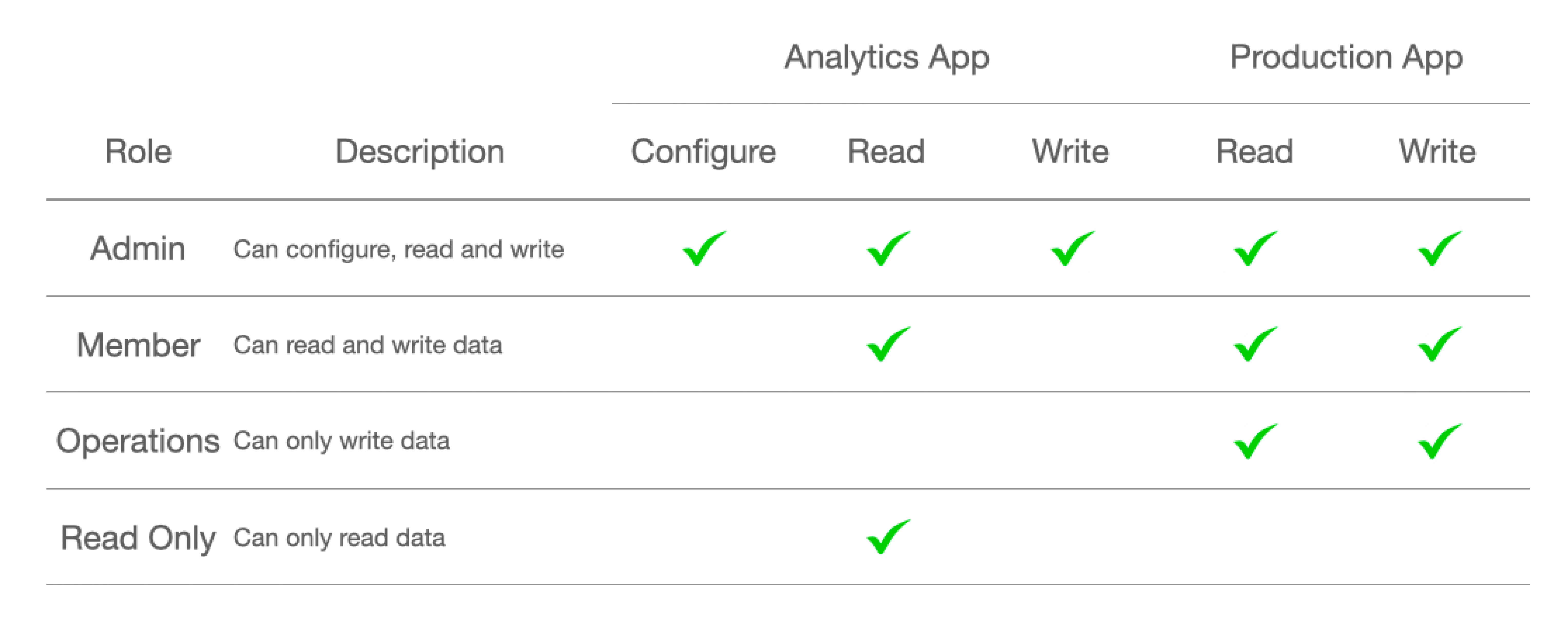
Serial supports 4 types of users:
### Inviting New Users
1. Click the **+ Add User** button
2. Enter first & last name
3. Enter email
4. Select user type
5. Click **Save** button
### 2 Factor Authentication
Invited users will need to verify their email and provide a phone number for 2 factor authentication
 ### Inviting New Users
1. Click the **+ Add User** button
2. Enter first & last name
3. Enter email
4. Select user type
5. Click **Save** button
### 2 Factor Authentication
Invited users will need to verify their email and provide a phone number for 2 factor authentication
### Inviting New Users
1. Click the **+ Add User** button
2. Enter first & last name
3. Enter email
4. Select user type
5. Click **Save** button
### 2 Factor Authentication
Invited users will need to verify their email and provide a phone number for 2 factor authentication